 Digital Sense
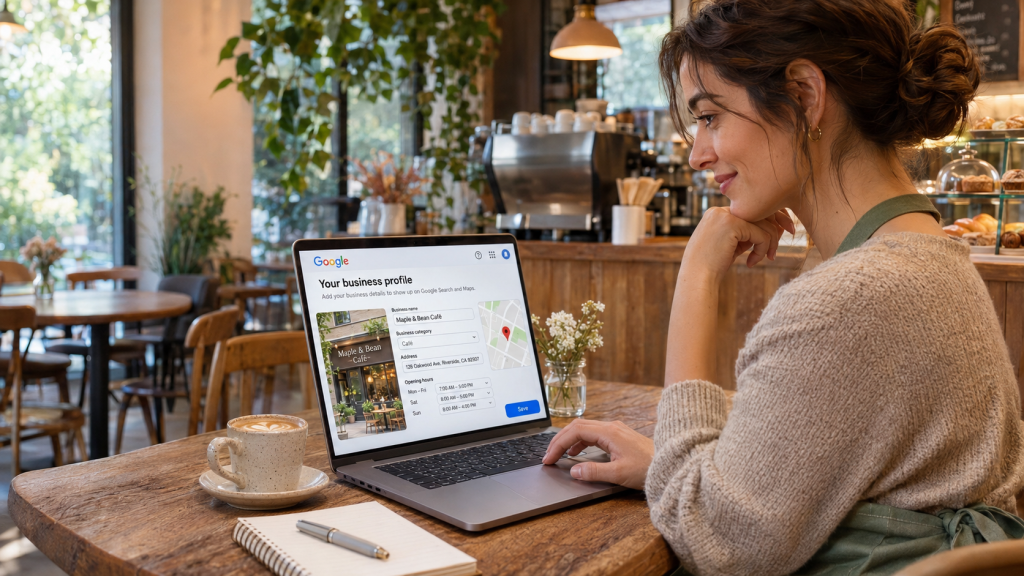
Your customers are already searching. Are you there?
Right now, someone in Toronto is typing “furnace repair near me”, a parent in Calgary is searching “dentist open Saturday” and a tourist in Halifax wants “best seafood near me”. In a few seconds, they will pick one of three businesses on a map and call, visit or ask for directions.
If your business is not on that map, that customer goes to your competitor. Not because they are better, but because they were visible.
The good news? Getting your business on Google is free anywhere in Canada, from a corner shop in St. John’s to a clinic in Victoria. Setup takes about 30 minutes and does not need a website. This guide walks you through every click, from creating your Google Business Profile to verifying it and making it rank.
Quick answer: To get your business on Google in Canada for free, go to google.com/business, sign in with a Google account, enter your business name, category, location or service area, phone number and website, then verify ownership using the method Google offers (video, phone, email or a Canada Post postcard). Once verified, your business can appear on Google Search and Google Maps, usually within a few days.
What is Google Business Profile (and is it really free)?
Google Business Profile (GBP) is Google’s free tool for putting your business on Google Search and Google Maps. It is the new name for what used to be called Google My Business, so if you see either term, they mean the same thing.
Yes, it is 100% free. There is no setup fee, no monthly charge and no paid upgrade that ranks you higher. Google’s own help center says you cannot pay for a better local ranking. Anyone offering a “guaranteed #1 spot on Maps” for a fee is selling something Google does not sell.
Here is what a verified profile unlocks for your business:
| Feature | What customers see | Why it matters |
|---|---|---|
| Map listing | Your pin on Google Maps and in the local 3-pack | Shows up for “near me” searches |
| Call and directions buttons | One tap to call or navigate | Turns a search into a visit in seconds |
| Reviews and star rating | Stars beside your name | Builds trust before the first contact |
| Photos and videos | Your storefront, team, products | Customers know what to expect |
| Opening hours | Open now / closes at 9 PM | Stops wasted trips and lost calls |
| Posts and offers | Updates, events, discounts | Free promotion right on Google |
| Messaging and bookings | Chat or book from the listing | Captures leads without a website |
| Performance insights | Searches, calls, direction requests | Shows exactly what is working |
Who can get a profile? Any Canadian business that meets customers face to face: a shop, restaurant or clinic customers visit, or a service-area business that travels to customers (plumbers, snow-removal crews, HVAC technicians, cleaners, mobile groomers). You do not need a CRA Business Number or a provincial registration to create a profile, but registration documents are useful proof if verification gets tough. Online-only businesses, such as e-commerce stores with no customer-facing location, are not eligible, and choosing that option can lead to suspension.
Running a business in Quebec? Google Business Profile works fully in French, and customers can see your listing in their language. Quebec’s Charter of the French Language, as amended by Bill 96, requires French in commercial communications such as advertising and online content, so write your description, services and posts in French (adding English is fine). This is not legal advice; check with a Quebec lawyer for your situation.
Before you start: your 5-minute prep checklist
Gather these first and the setup takes one sitting instead of three. Most failed verifications trace back to a detail that did not match, so get it right here.
| What you need | Canadian example | Pro tip |
|---|---|---|
| A Google account | northlinebakery@gmail.com | Use a business-owned account, not a staff member’s personal one |
| Exact business name | Northline Bakery | Use your real-world name only. No keywords like “Best Bakery Toronto” |
| Primary category | Bakery | Pick the most specific match; you can add more later |
| Address or service area | Unit 4, 123 Example St, Toronto, ON M5V 1A1 | Include the unit number and a correctly formatted postal code (A1A 1A1) |
| Phone number | +1 416-555-0123 | Use a local area code you answer daily; Google may call, text or WhatsApp it |
| Website (optional) | northlinebakery.ca | A .ca domain signals a Canadian business to customers |
| Opening hours | Mon–Sat, 7 AM–6 PM | Add special hours for statutory holidays |
| 5–10 real photos | Storefront, interior, products | Bright, real photos; no stock images |
| Proof for verification | Signage, keys, business card, hydro or utility bill, provincial registration | Keep these ready for a video check |
Golden rule: NAP consistency. Your Name, Address and Phone (NAP) should read the same on Google, your website, Facebook page and every directory. Mismatches, like an old phone number on Facebook, a missing unit number on YellowPages.ca or a mistyped postal code on your website, confuse Google and weaken trust.
How to get your business on Google: step-by-step free setup
Follow these eight steps in order. You can do all of them from a laptop or from the Google Maps app on your phone.
- Search for your business first. Open Google Maps and type your business name. If a listing already exists (customers or Google sometimes create one), click Claim this business or Own this business? instead of making a new one. Duplicate listings split your reviews and can get both flagged.
- Go to google.com/business and sign in. Click Manage now and sign in with the business Google account from your checklist.
- Enter your business name. Type it exactly as it appears on your signage. Quebec businesses should use the French name shown on their signs. Google will suggest matches; pick yours if it shows, or choose to create a new one.
- Choose your primary business category. Start typing (“Dental clinic”, “Car repair”, “Boutique”) and choose the closest match. This single field has a big say in which searches you show up for.
- Add your location or service area.
- Customers visit you? Choose Yes, enter your full address and drag the map pin onto your exact entrance.
- You visit customers? Choose No, hide your address and list the cities or regions you serve, for example Mississauga, Brampton and Oakville, or the Lower Mainland in BC. Google allows up to 20 service areas.
- Both? Add the address and the service areas.
- Add contact details. Enter your phone number (with the +1 country code and local area code) and website. No site yet? Skip it for now; your profile still works.
- Start verification. Google now shows the verification options it will accept for your business (more on these in the next section). Screenshot this screen so you know which methods you have.
- Finish your profile while you wait. Add hours, a description, photos, services and products. A complete profile is more likely to pass verification and rank once it goes live.
How long until I show up? Once verified, most profiles start appearing on Search and Maps within a few days. Google says verification itself can take up to five business days, sometimes longer when a manual review is needed.
How to verify your Google Business Profile in Canada (2026)
Verification proves you really own and run the business. Until you pass it, you cannot edit details, upload photos, reply to reviews or see insights.
Here is the catch: you do not choose the method, Google does. It picks based on your business type, public information, region and hours. Since mid-2025, owners can no longer pick their own method; you only see “Change method” if you are eligible for more than one.
| Method | What you do | Typical time | Best for |
|---|---|---|---|
| Video recording | Film a continuous 30-second to 2-minute clip at your location | Review in about 5 days | Shops and offices with signage (now the most common option) |
| Phone or SMS | Enter a code sent to your business number | Minutes | Older listings that already exist on Google |
| Click the link Google sends | Minutes, plus up to a week of review | Businesses with a matching domain email | |
| Live video call | Show proof to a Google support agent in real time | Same session | When other methods fail |
| Postcard | Enter the code Canada Post delivers to your address (expires in 30 days) | 1–2 weeks | Rare today; allow extra time for rural and northern addresses |
| Instant | Nothing extra; Google already trusts you | Immediate | Sites already verified in Google Search Console |
| Bulk | Submit through the Chains option | Varies | Brands with 10+ locations |
How to pass video verification the first time?
Video is where most owners get stuck, so plan your clip before you press record. In one unbroken take, show:
- Where you are: your signboard, the street sign or neighbouring shops.
- That the business is real: products, equipment, branded packaging or uniforms.
- That you are in charge: unlock the door, open the cash counter or enter a staff-only area.
Record in daylight, keep the camera steady and review the clip before you submit. In winter, clear snow and frost off your sign and door decals first; if Google cannot read your signage, the video can fail. Service-area businesses can show a branded vehicle, tools and business documents.
Verification failed? Here is what to do
- “Review issues” notice: read Google’s note, fix the missing proof and resubmit a new video.
- “No more ways to verify”: use the on-screen link to contact Google support. Have photos of signage, a recent hydro or utility bill, your provincial business registration and your website ready. Support is available in English and French. Support may follow up with a live video call.
- Someone else owns the listing: use Request ownership. If the current owner does not reply, Google’s email will walk you through verifying yourself.
- Asked to verify again: this often follows a change to your name, address, category or hours. Since March 2026, Google may also check details through automated calls, texts or WhatsApp messages to your listed number, so keep that line monitored.
How to optimize your Google Business Profile to rank higher
Getting listed puts you on Google. Getting optimized puts you in the top three. According to Google’s own help center, local results are based mainly on relevance, distance and prominence.
How Google ranks local results · 3 factors
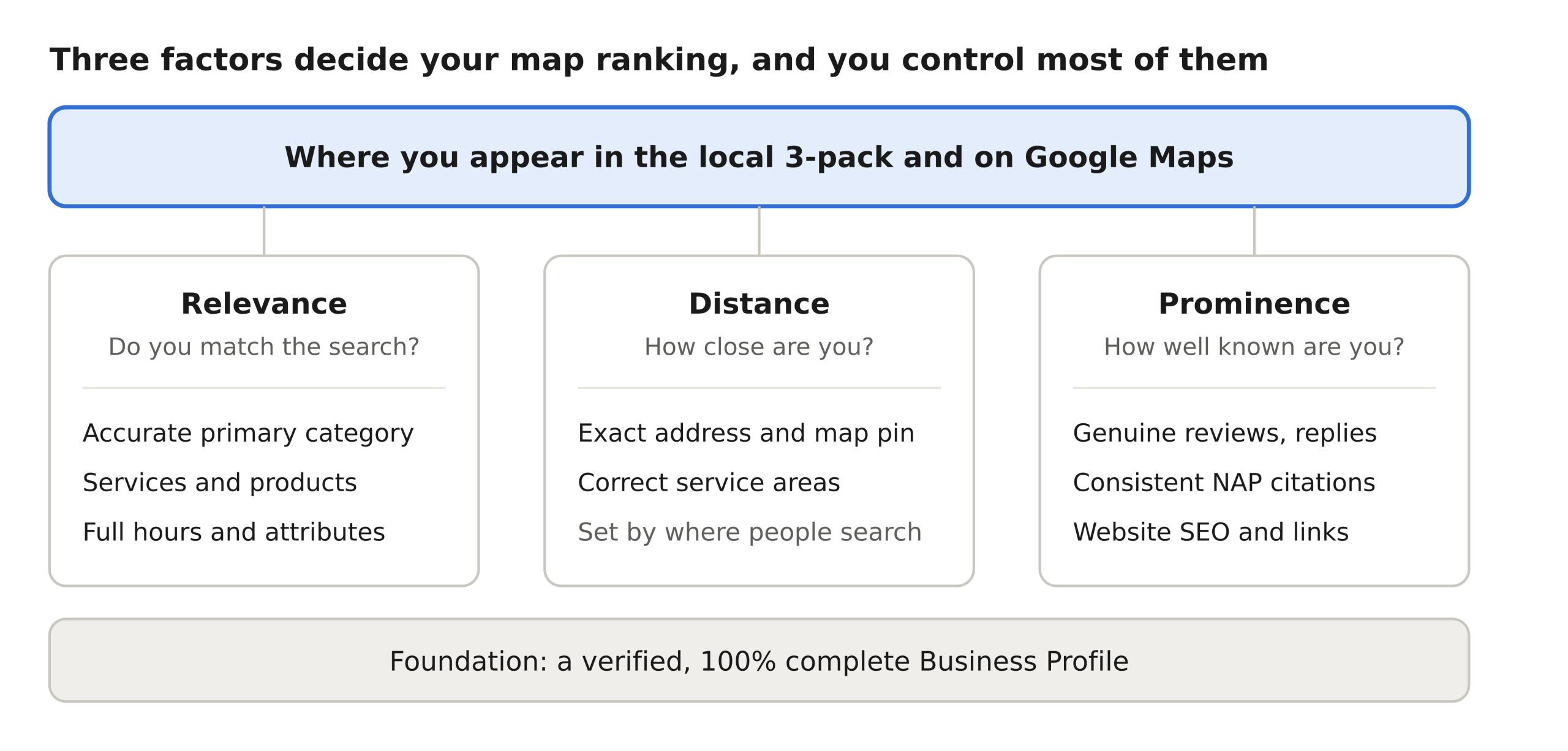
You cannot move closer to every searcher, but relevance and prominence are fully in your hands. Here is how to win both.
Relevance: tell Google exactly what you do
- Categories: pick one precise primary category, then add secondary ones that genuinely apply (“Bakery” plus “Cake shop”).
- Description: write 750 characters in plain language. Say what you sell, who you serve and where. Mention your city and neighbourhood naturally (“serving the Annex and Yorkville”), without stuffing keywords. In Quebec or bilingual markets like Ottawa–Gatineau and Moncton, write it in French as well.
- Services and products: list each one with a short description and price where possible. These help you match long-tail searches like “gluten-free birthday cake delivery Vancouver”. Show prices in CAD.
- Attributes: tick everything that applies: wheelchair access, women-owned, free Wi-Fi, online appointments.
Prominence: give Google reasons to trust you
- Reviews: Google confirms that review count and rating feed local ranking. Ask every happy customer, and reply to every review, good or bad, within 48 hours. Need a system for it? See our reviews and reputation service.
- Photos: upload new, real photos every month: exterior (helps people find you), interior, team, products and work in progress.
- Google Posts: share an offer, event or update weekly. Posts keep your profile active and give searchers a reason to choose you.
- Citations and links: consistent listings and mentions across the web tell Google you are a real, established business.
Weekly 10-minute maintenance routine
- ☐ Reply to new reviews
- ☐ Answer new questions and messages
- ☐ Publish one Google Post
- ☐ Upload one or two fresh photos
- ☐ Check hours before statutory holidays (Victoria Day, Canada Day, Civic Holiday, Labour Day, Thanksgiving, Boxing Day) and update them for snow days
- ☐ Review Performance insights: calls, direction requests, website clicks
7 mistakes that keep businesses off Google (or get them suspended)
A suspended profile disappears from Maps overnight, and reinstatement can take weeks. Avoid these and you avoid most of the pain.
| Mistake | Why it hurts | Do this instead |
|---|---|---|
| Keyword-stuffed name (“Maple Plumbing Best Plumber Mississauga”) | Breaks Google’s name rules; a top cause of suspension | Use your real, signboard name only |
| Virtual office, Canada Post box or UPS Store mailbox address | Not a real place customers can visit | Use your actual premises or hide the address as a service-area business |
| Creating a second listing for the same location | Splits reviews and triggers duplicate flags | Claim and fix the existing one |
| Fake or bought reviews | Google removes them and may penalize the profile; the Competition Bureau of Canada also treats fake reviews as deceptive marketing | Ask real customers with a short review link; never pay or offer discounts for reviews |
| Editing name, address and category all at once | Can trigger re-verification or a review hold | Change one thing at a time, only when needed |
| Stock photos | Look untrustworthy; real photos earn more clicks | Upload real photos of your place, team and work |
| Set it and forget it | Old hours and unanswered reviews cost customers | Check the profile every week |
For the full rulebook, read Google’s Business Profile guidelines before you make big edits.
Beyond the map pin: 7 ways to turn your listing into customers
A Business Profile gets you on the map. These seven steps turn that listing into booked customers.
- Get a simple website. Google ranks local listings partly on how well your website ranks, so even a five-page site with your services, location and contact details lifts your profile. See how we build websites that bring in enquiries.
- Add your site to Google Search Console. It is free, shows which searches find you and can even make Business Profile verification instant.
- Build local citations. List your business, with identical NAP details, on trusted Canadian directories: YellowPages.ca, Canada411, Yelp Canada, the Better Business Bureau, your local chamber of commerce, Bing Places and Apple Business Connect, plus your Facebook and Instagram pages. Each consistent mention strengthens prominence. Our Google and local visibility service handles this end to end.
- Make reviews a habit. Share your review link on receipts, text follow-ups and thank-you emails, and reply to every one. Got a bad one? Use our templates for responding to negative Google reviews.
- Show up in AI answers too. Tools like Google’s AI Overviews, ChatGPT and Gemini pull from your profile, reviews and website. A clear FAQ section and schema markup help them recommend you. Read which simple AEO strategies are working right now and why FAQs and schema markup matter.
- Answer every enquiry fast. Your profile will send calls and messages. A lead that hits voicemail at 6 PM often calls the next business on the map. CRM and lead follow-up makes sure someone replies in minutes.
- Ready to pay for the top spot? Organic ranking takes time. If you need calls this week, compare what Google Ads cost a small business or read Google Ads vs. Facebook Ads.
Want all of this handled for you? Our Get more customers team can set up, verify and optimize your profile for you, anywhere in Canada.
Your 30-minute move that pays for years
Getting your business on Google costs nothing but half an hour, and it puts you in front of people who are ready to buy today. Claim or create your profile, get verified, fill in every field and keep it fresh. That is the whole formula.
The businesses winning the map pack are not always the biggest. They are the ones that showed up, filled in the details and kept talking to their customers.
Not sure if customers can find you? Search your business type and your city on your phone right now. If you are not in the top three, book a free 20-minute review with Digital Sense. We will screen-share your Google listing, website and how you handle new enquiries, then send a written report within 48 hours, whether you hire us or not. Prefer to talk? Call (416) 677-8617.
Frequently asked questions
How do I put my business on Google for free in Canada?
Create a Google Business Profile at google.com/business. Add your name, category, location or service area, phone and website, then verify ownership. There is no cost at any step.
Can I list my business on Google without a website?
Yes. A website is optional. Your profile can take calls, messages and direction requests on its own, though adding a website later helps you rank.
Can I list a home-based business on Google Maps?
Yes, as a service-area business. Hide your home address and list the areas you serve instead. Customers see your service area, not your street.
How long does Google Business Profile verification take?
Phone and email codes arrive within minutes. Video reviews usually take about five business days. A Canada Post postcard can take one to three weeks, longer for rural or northern addresses.
Why is my business not showing on Google?
The usual reasons are an unverified or suspended profile, a very new listing, an incomplete profile or strong nearby competitors. Search your exact business name first; if it appears, the issue is ranking, not visibility.
Is Google My Business the same as Google Business Profile?
Yes. Google renamed Google My Business to Google Business Profile. The free listing works the same way.
Can I set up my Google Business Profile in French?
Yes. You can enter your name, description, services and posts in French. Quebec businesses should lead with French to match the province’s language rules, and bilingual businesses elsewhere can include both languages.
How do I rank higher on Google Maps in my Canadian city?
Complete every field, choose accurate categories, add real photos, collect genuine reviews and reply to them, and keep your NAP details consistent on Canadian directories like YellowPages.ca and Canada411. Paying Google does not improve local ranking.
Schema note: mark up this section with FAQPage schema so each answer can appear in rich results and AI answers (why it matters).
You may also like

Want to know where your customers are slipping away?
A live look at your website, Google listing and follow-up, plus a written report in 48 hours.