 Digital Sense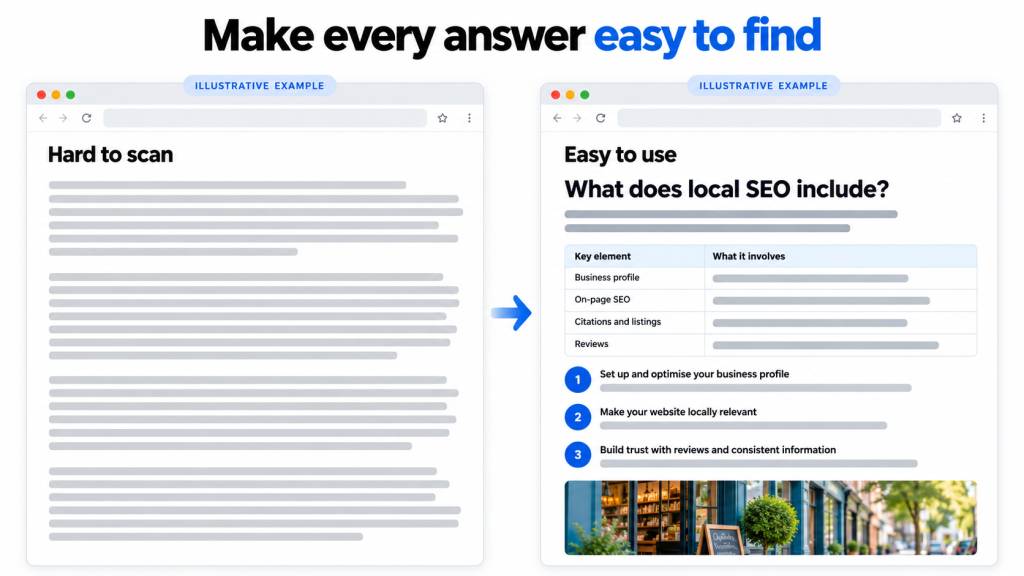
Your next customer might meet your business inside an AI-generated answer.
The question is: does your website give them something worth finding?
A page full of general advice offers little reason to choose your business. A page that answers a real question, explains the options and shows proof gives readers something useful.
That is where choosing the right content formats for AI search helps.
What Content Formats Work Well for AI Search?
Direct answers, comparison tables, step-by-step guides, original case studies and focused FAQs are practical formats to use. Choose the format that helps someone understand their question or make a decision.
Microsoft recommends clear headings, tables and FAQ sections to make information easier to reference in AI answers. However, no format guarantees a citation or higher visibility.
| Customer’s question | Useful content format | Example |
| “What is it?” | Short definition | What is local SEO? |
| “Which should I choose?” | Comparison table | Local SEO vs Google Ads |
| “How do I do it?” | Numbered guide | How to update business hours on Google |
| “How much does it cost?” | Pricing breakdown | Website cost by scope and features |
| “Does it actually work?” | Case study with evidence | What changed after a website update |
| “Why isn’t it working?” | Troubleshooting guide | Why a business profile has incorrect hours |
| “Is it right for me?” | Decision checklist | When a small business needs an online store |
You do not need every format on every page. Match the format to the question.
Also Read: Does Responding to Google Reviews Help Local SEO?
Put a Clear Answer Before the Explanation
When someone asks a specific question, answer it before introducing background information.
For example:
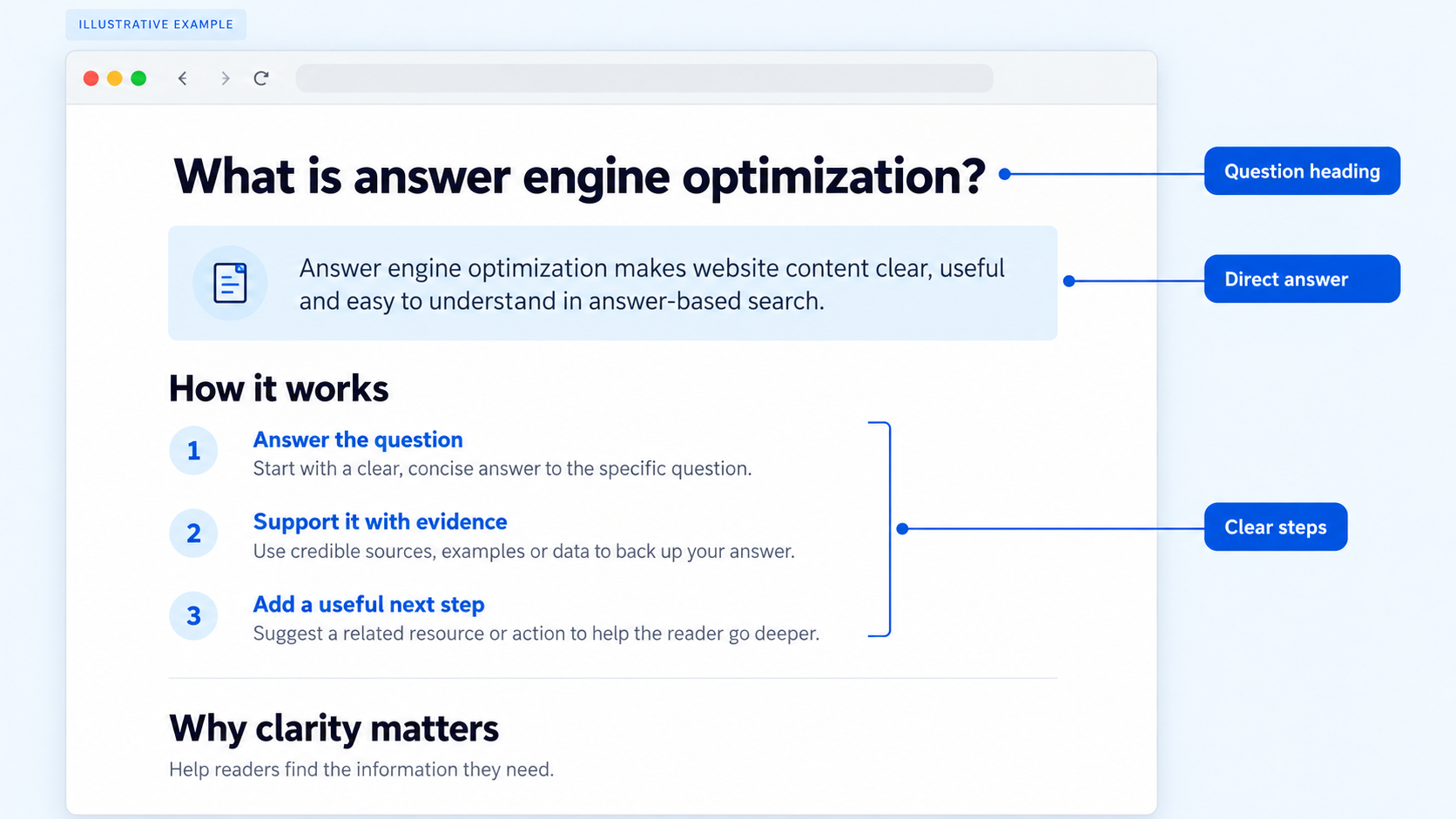
What is answer engine optimization?
Answer engine optimization, or AEO, is the practice of making website content clear, useful and easy to understand in answer-based search experiences.
Then explain the details, examples and limitations.
A useful section structure is:
- A heading that names the question.
- A short, direct answer.
- Supporting evidence or an example.
- A practical next step.
There is no magic paragraph length. Give the reader enough information to understand the answer without making them hunt for it.
Use Comparison Tables to Support Decisions
People comparing services usually want to understand differences, costs and trade-offs.
A useful table makes those differences visible.
For example, a business writing about SEO vs paid advertising could include:
| Factor | SEO | Paid search advertising |
| Main investment | Website, content and ongoing optimization | Campaign management and advertising spend |
| Timing | Results develop over time | Traffic can begin after approval and launch |
| Ongoing requirement | Maintain relevance and website quality | Maintain budget and campaign performance |
| Suitable goal | Build organic search visibility | Reach people through targeted campaigns |
Follow the table with a recommendation that explains who each option suits and why.
Avoid vague labels such as “best quality” or “great value” unless you explain what supports them.
Also Read: Can Small Business Websites Get Recommended by ChatGPT?
Turn Instructions Into Step-by-Step Guides
A how-to page should help someone finish a task.
For a guide about updating Google Business Profile hours, each step should explain one action. Add screenshots where readers need help finding a setting.
Good instructional content includes:
- What the reader needs before starting.
- Steps in the order they should follow.
- Screenshots of important actions.
- What successful completion looks like.
- Common problems and their fixes.
Skip screenshots that simply repeat the text. Use them where they remove uncertainty.
Add Original Evidence Through Case Studies
General tips are easy to repeat. Your own work can add information readers cannot get elsewhere.
A useful case study answers:
| Element | What to explain |
| Starting problem | What was happening before the work? |
| Action | What specifically changed? |
| Time period | When was the work completed and measured? |
| Evidence | Which records support the result? |
| Limitations | What else might have affected performance? |
Use real figures, permission-approved examples and clearly labelled screenshots. Separate what you observed from what you believe caused it.
A specific, honest example is more useful than an impressive claim without evidence.
How Should You Use Images, Screenshots and Video?
Use visuals to explain something that words alone make harder to understand.
Google recommends supporting text with relevant, high-quality images and videos while keeping important information available as text.
The accompanying illustration shows how a dense page can become easier to use through a direct answer, a table and clear steps. It is an illustrative mockup, rather than a live website screenshot.
| Visual | Best use | What to include |
| Original screenshot | Show where to click or verify a finding | Relevant crop, short annotation and capture date |
| Comparison graphic | Explain differences quickly | Clear labels and a nearby text explanation |
| Original photograph | Show products, people or completed work | Helpful caption and descriptive alt text |
| Short demonstration video | Explain a process or product | Captions and a written summary |
For genuine search-result screenshots, include the query, platform and date. One screenshot documents one result; it does not prove consistent rankings.
How Do You Cover Related Questions Without Writing Too Much?
Cover one main topic well, then link to deeper answers.
For this topic, the main question is which content formats to use. Supporting questions include whether FAQs help, whether schema is required and how to measure visibility.
A detailed tutorial on implementing schema deserves its own page.
Use customer conversations, support requests and Reddit discussions to discover questions. Then verify the answers using reliable sources and your own experience. Reddit can reveal confusion; a comment alone does not establish a fact.
Do You Need Special AI SEO Formatting or Schema?
For Google AI Overviews and AI Mode, there is no special schema or AI text file required. Existing SEO fundamentals still apply. Eligible pages must be indexed and able to appear with a search snippet, but eligibility does not guarantee inclusion.
Treat AEO and generative engine optimization (GEO) as reasons to improve clarity and usefulness not reasons to fill pages with repeated questions or keywords.
How Can You Measure AI Search Visibility?
Track whether visibility supports meaningful business outcomes.
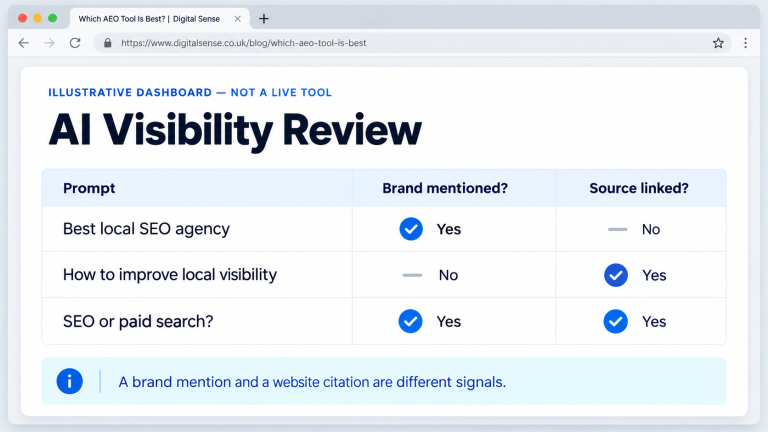
Bing Webmaster Tools’ AI Performance reporting shows citations and cited pages across supported Microsoft AI experiences. Use that alongside website analytics to assess referral visits, enquiries and conversions.
Keep a record of content updates and review performance over time. A mention is useful exposure; a qualified enquiry tells you more about business value.
Help More Customers Discover Your Business
Your expertise deserves to be found.
Digital Sense can help your business improve its visibility in AI search results through useful content, clear website structure and sound SEO helping more potential customers discover your services and supporting business growth.
Grow Your Visibility With Digital Sense
Frequently Asked Questions
What is the best content format for AI search?
There is no universal winner. Use direct answers for definitions, tables for comparisons, numbered guides for tasks and case studies for evidence.
Do FAQ sections help with AI search?
FAQs can make related answers easier to find and understand. Include genuine questions that the page has not already answered fully. Adding FAQs alone does not guarantee citations.
How long should an AI-search-friendly blog be?
Long enough to answer the main question and important follow-ups. Remove repetition and move detailed side topics into separate articles. There is no required word count.
Should I update existing blogs or create new ones?
Start by reviewing relevant existing pages. Improve incomplete answers, outdated facts and weak examples. Create a new page when the question needs a distinct, useful answer.
You may also like

Want to know where your customers are slipping away?
A live look at your website, Google listing and follow-up, plus a written report in 48 hours.